HAProxy + Galera Cluster (MariaDB) 1/2

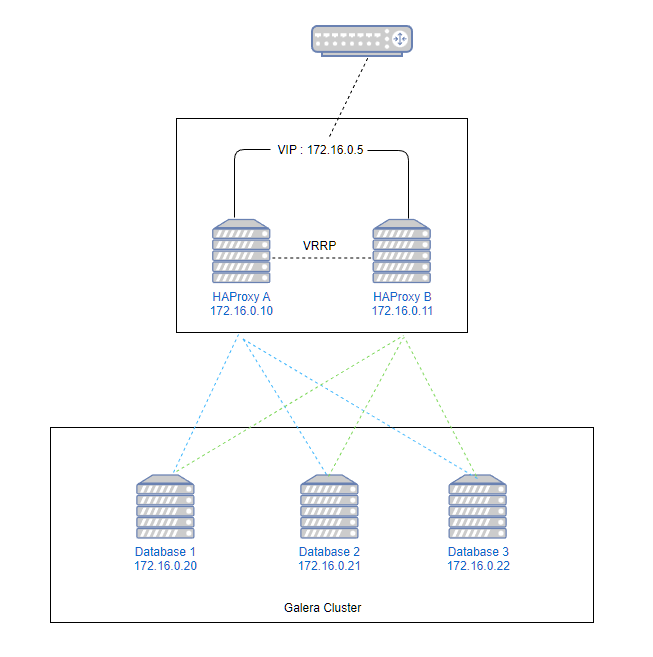
Galera Cluster

우분투 20.04 에서 진행한다. 패키지관리자에서 제공하는 mariadb-server를 설치하면 galera3이 같이 설치된다.

$ apt update && apt upgrade -y
$ apt install -y mariadb-server

Galera 클러스터 설정하기

  1. wsrep_cluster_address : 전체 노드의 아이피를 쉼표로 구분해서 모두 입력
  2. wsrep_node_address : 현재 노드의 아이피를 입력
  3. wsrep_node_name : 현재 노드를 구분할 이름을 입력

Database1

/etc/mysql/mariadb.conf.d/60-galera.cnf

[galera]
binlog_format=ROW
default-storage-engine=innodb
innodb_autoinc_lock_mode=2
bind-address=0.0.0.0

# Galera Provider Configuration
wsrep_on=ON
wsrep_provider=/usr/lib/galera/libgalera_smm.so

# Galera Cluster Configuration
wsrep_cluster_name="galera_cluster"
wsrep_cluster_address="gcomm://172.16.0.20,172.16.0.21,172.16.0.22"

# Galera Synchronization Configuration
wsrep_sst_method=rsync

# Galera Node Configuration
wsrep_node_address="172.16.0.20"
wsrep_node_name="node1"

Database2

/etc/mysql/mariadb.conf.d/60-galera.cnf

[galera]
binlog_format=ROW
default-storage-engine=innodb
innodb_autoinc_lock_mode=2
bind-address=0.0.0.0

# Galera Provider Configuration
wsrep_on=ON
wsrep_provider=/usr/lib/galera/libgalera_smm.so

# Galera Cluster Configuration
wsrep_cluster_name="galera_cluster"
wsrep_cluster_address="gcomm://172.16.0.20,172.16.0.21,172.16.0.22"

# Galera Synchronization Configuration
wsrep_sst_method=rsync

# Galera Node Configuration
wsrep_node_address="172.16.0.21"
wsrep_node_name="node2"

Database3

/etc/mysql/mariadb.conf.d/60-galera.cnf

[galera]
binlog_format=ROW
default-storage-engine=innodb
innodb_autoinc_lock_mode=2
bind-address=0.0.0.0

# Galera Provider Configuration
wsrep_on=ON
wsrep_provider=/usr/lib/galera/libgalera_smm.so

# Galera Cluster Configuration
wsrep_cluster_name="galera_cluster"
wsrep_cluster_address="gcomm://172.16.0.20,172.16.0.21,172.16.0.22"

# Galera Synchronization Configuration
wsrep_sst_method=rsync

# Galera Node Configuration
wsrep_node_address="172.16.0.22"
wsrep_node_name="node3"

클러스터 초기화

첫번째 노드에서 실행한다

$ galera_new_cluster

서비스 재시작

각 노드별로 실행해준다

$ systemctl restart mariadb.service

클러스터 상태 확인

$ mysql -uroot -p
MariaDB [(none)] > show status like 'wsreq%';
+-------------------------------+----------------------------------------------------------+
| Variable_name                 | Value                                                    |
+-------------------------------+----------------------------------------------------------+
| wsrep_applier_thread_count    | 1                                                        |
| wsrep_apply_oooe              | 0.000000                                                 |
| wsrep_apply_oool              | 0.000000                                                 |
| wsrep_apply_window            | 1.000000                                                 |
| wsrep_causal_reads            | 0                                                        |
| wsrep_cert_deps_distance      | 95.038207                                                |
| wsrep_cert_index_size         | 106                                                      |
| wsrep_cert_interval           | 0.000000                                                 |
| wsrep_cluster_conf_id         | 22                                                       |
| wsrep_cluster_size            | 3                                                        |
| wsrep_cluster_state_uuid      | 2f9b1216-670b-11ed-a410-02c6026a7d9b                     |
| wsrep_cluster_status          | Primary                                                  |
| wsrep_cluster_weight          | 3                                                        |
| wsrep_commit_oooe             | 0.000000                                                 |
| wsrep_commit_oool             | 0.000000                                                 |
| wsrep_commit_window           | 1.000000                                                 |
| wsrep_connected               | ON                                                       |
| wsrep_desync_count            | 0                                                        |
| wsrep_evs_delayed             |                                                          |
| wsrep_evs_evict_list          |                                                          |
| wsrep_evs_repl_latency        | 0.00183486/0.00210722/0.00237959/0.000272366/2           |
| wsrep_evs_state               | OPERATIONAL                                              |
| wsrep_flow_control_paused     | 0.000068                                                 |
| wsrep_flow_control_paused_ns  | 395662483                                                |
| wsrep_flow_control_recv       | 15                                                       |
| wsrep_flow_control_sent       | 1                                                        |
| wsrep_gcomm_uuid              | 9ca4e10d-6a23-11ed-9e58-135c9b8d1ba7                     |
| wsrep_incoming_addresses      | 172.16.0.20:3306,172.16.0.21:3306,172.16.0.22:3306 |
| wsrep_last_committed          | 1941702                                                  |
| wsrep_local_bf_aborts         | 0                                                        |
| wsrep_local_cached_downto     | 1885300                                                  |
| wsrep_local_cert_failures     | 0                                                        |
| wsrep_local_commits           | 0                                                        |
| wsrep_local_index             | 1                                                        |
| wsrep_local_recv_queue        | 0                                                        |
| wsrep_local_recv_queue_avg    | 0.401237                                                 |
| wsrep_local_recv_queue_max    | 110                                                      |
| wsrep_local_recv_queue_min    | 0                                                        |
| wsrep_local_replays           | 0                                                        |
| wsrep_local_send_queue        | 0                                                        |
| wsrep_local_send_queue_avg    | 0.000000                                                 |
| wsrep_local_send_queue_max    | 1                                                        |
| wsrep_local_send_queue_min    | 0                                                        |
| wsrep_local_state             | 4                                                        |
| wsrep_local_state_comment     | Synced                                                   |
| wsrep_local_state_uuid        | 2f9b1216-670b-11ed-a410-02c6026a7d9b                     |
| wsrep_open_connections        | 0                                                        |
| wsrep_open_transactions       | 0                                                        |
| wsrep_protocol_version        | 9                                                        |
| wsrep_provider_name           | Galera                                                   |
| wsrep_provider_vendor         | Codership Oy <info@codership.com>                        |
| wsrep_provider_version        | 3.29(ra60e019)                                           |
| wsrep_ready                   | ON                                                       |
| wsrep_received                | 57714                                                    |
| wsrep_received_bytes          | 17158682                                                 |
| wsrep_repl_data_bytes         | 0                                                        |
| wsrep_repl_keys               | 0                                                        |
| wsrep_repl_keys_bytes         | 0                                                        |
| wsrep_repl_other_bytes        | 0                                                        |
| wsrep_replicated              | 0                                                        |
| wsrep_replicated_bytes        | 0                                                        |
| wsrep_rollbacker_thread_count | 1                                                        |
| wsrep_thread_count            | 2                                                        |
+-------------------------------+----------------------------------------------------------+

wsrep_cluster_size : 클러스터에 가입된 있는 노드수
wsrep_incoming_addresses : 클러스터에 가입된 아이피
wsrep_local_state_comment : 현재 노드 상태 (다른 노드들과 데이터가 동기화되어 있는 상태면 Synced)

Apache James 메일서버 – 운영

0. 서비스 시작

cd /usr/local/james
./bin/james start

1. 서비스 상태확인

./bin/james status
root@mail:/usr/local/james# ./bin/james status
Apache James :: Server :: Spring :: App is running (22938).

2. 중지하기, 재시작

./bin/james stop
./bin/james restart

3. 로그파일

tail -f log/wrapper.log

자세한 로그를 얻기위해서는 conf/log4j2.xml 파일을 수정하고 재시작하면 된다. status 속성을 변경한다.

<?xml version="1.0" encoding="UTF-8"?>
<Configuration status="INFO" monitorInterval="30">

4. 도메인 추가

conf/domainlist.xml 파일에서 도메인을 추가하지 않고 james-cli 명령을 이용해서 추가가 가능하다.

./bin/james-cli AddDomains domain.com

5. 사용자 추가

도메인을 추가하면 해당 도메인내에서 사용이 가능한 사용자를 추가할 수 있다. 사용자명은 도메인을 포함한 이메일주소여야 한다.
james-cli Adduser <username> <password>

./bin/james-cli AddUser me@jongwan.com 1234

비밀번호 변경하기

./bin/james-cli SetPassword me@jongwan.com abcd1234

사용자 삭제하기

./bin/james-cli RemoveUser me@jongwan.com

6. 사용가능한 CLI 명령어

root@mail:/usr/local/james# ./bin/james-cli.sh
You must specify a command.
usage: java org.apache.james.cli.ServerCmd --host <arg> <command>
 -h,--host <arg>   node hostname or ip address
 -p,--port <arg>   remote jmx agent port number
AddUser <username> <password>
RemoveUser <username>
ListUsers
AddDomain <domainName>
RemoveDomain <domainName>
ContainsDomain <domainName>
ListDomains
ListMappings
ListUserDomainMappings <user> <domain>
AddAddressMapping <fromUser> <fromDomain> <toAddress>
RemoveAddressMapping <fromUser> <fromDomain> <toAddress>
AddRegexMapping <user> <domain> <regex>
RemoveRegexMapping <user> <domain> <regex>
SetPassword <username> <password>
CopyMailbox <srcBean> <dstBean>
DeleteUserMailboxes <user>
CreateMailbox <namespace> <user> <name>
ListUserMailboxes <user>
DeleteMailbox <namespace> <user> <name>
ImportEml <namespace> <user> <name> <path>
GetStorageQuota <quotaroot>
GetMessageCountQuota <quotaroot>
GetQuotaroot <namespace> <user> <name>
GetMaxStorageQuota <quotaroot>
GetMaxMessageCountQuota <quotaroot>
SetMaxStorageQuota <quotaroot> <maxMessageCount>
SetMaxMessageCountQuota <quotaroot> <maxStorage>
SetGlobalMaxStorageQuota <maxStorage>
SetGlobalMaxMessageCountQuota <maxMessageCount>
GetGlobalMaxStorageQuota
GetGlobalMaxMessageCountQuota
ReindexMailbox <namespace> <user> <name>
ReindexAll
GetSieveQuota
SetSieveQuota <quota>
RemoveSieveQuota
GetSieveUserQuota <username>
SetSieveUserQuota <username> <quota>
RemoveSieveUserQuota <username>
AddActiveSieveScript <username> <scriptname> <path>

Apache James 메일서버 – 환경설정

0. conf/domainlist.xml

메일서버에서 사용하는 도메인을 지정해준다.
아래 설정에서는 두개의 도메인을 사용하는 것을 기준으로 했다.

  • jongwan.com
  • another-domain.com
<?xml version="1.0"?>
<domainlist class="org.apache.james.domainlist.jpa.JPADomainList">
  <autodetect>false</autodetect>
  <autodetectIP>false</autodetectIP>
  <defaultDomain>jongwan.com</defaultDomain>
    <domainnames>
      <domainname>jongwan.com</domainname>      
      <domainname>another-domain.com</domainname>
    </domainnames>
</domainlist>
  • defaultDomain : 기본 도메인을 지정한다. domainname 항목중에 하나를 지정한다.
  • domainnames.domainname : 사용할 도메인을 추가한다. domainname 항목을 추가해서 여러개의 도메인을 사용할 수 있다.

1. conf/dnsservice.xml

DNS 서버를 지정한다. 자동으로 했을 때 문제가 있어 강제로 지정했다.

<?xml version="1.0"?>
<dnsservice>
  <servers>
    <server>1.1.1.1</server>
  </servers>
  <autodiscover>false</autodiscover>
  <authoritative>false</authoritative>
  <maxcachesize>50000</maxcachesize>
</dnsservice>
  • autodiscover : 기본값은 true인데, 동작을 잘 안해서 변경했다.
  • servers.server : 1.1.1.1로 강제 지정했다.

2. keystore

TLS사용을 위해서 키를 생성한다.
smtpserver.xml, imapserver.xml에서 사용한다.

/usr/local/james 위치에 설치기준

keytool -genkey -alias james -keyalg RSA -storetype PKCS12 -keystore /usr/local/james/conf/keystore
Enter keystore password: 
Re-enter new password:
What is your first and last name?
  [Unknown]:  Jongwan Kim
What is the name of your organizational unit?
  [Unknown]:  None
What is the name of your organization?
  [Unknown]:  None
What is the name of your City or Locality?
  [Unknown]:  Seoul
What is the name of your State or Province?
  [Unknown]:  Guro-gu
What is the two-letter country code for this unit?
  [Unknown]:  KR
Is CN=Jongwan Kim, OU=None, O=None, L=Seoul, ST=Guro-gu, C=KR correct?
  [no]:  y

3. conf/smtpserver.xml

메일 발송을 위한 SMTP 설정을 한다.
25번 포트와 465번 포트설정이 각각 smtpserver 항목으로 있다.

<?xml version="1.0"?>
<smtpservers>
  <smtpserver enabled="true">
    <jmxName>smtpserver</jmxName>
    <bind>0.0.0.0:25</bind>
    <connectionBacklog>200</connectionBacklog>
    <tls socketTLS="false" startTLS="false">
      <keystore>file://conf/keystore</keystore>
      <keystoreType>PKCS12</keystoreType>
      <secret>123456</secret>
      <provider>org.bouncycastle.jce.provider.BouncyCastleProvider</provider>
      <algorithm>SunX509</algorithm>
    </tls>
    <connectiontimeout>360</connectiontimeout>
    <connectionLimit>0</connectionLimit>
    <connectionLimitPerIP>0</connectionLimitPerIP>
    <auth>
      <plainAuthEnabled>true</plainAuthEnabled>
    </auth>
    <authorizedAddresses>127.0.0.0/24, 192.168.0.0/24, 100.100.100.0/24</authorizedAddresses>
    <maxmessagesize>0</maxmessagesize>
    <addressBracketsEnforcement>true</addressBracketsEnforcement>
    <handlerchain>
      <handler class="org.apache.james.smtpserver.fastfail.ValidRcptHandler"/>
      <handler class="org.apache.james.smtpserver.CoreCmdHandlerLoader"/>       
    </handlerchain>           
  </smtpserver>
  <smtpserver enabled="true">
    <jmxName>smtpservertls</jmxName>
    <bind>0.0.0.0:465</bind>
    <connectionBacklog>200</connectionBacklog>
    <tls socketTLS="false" startTLS="true">
      <keystore>file://conf/keystore</keystore>
      <keystoreType>PKCS12</keystoreType>
      <secret>123456</secret>
      <provider>org.bouncycastle.jce.provider.BouncyCastleProvider</provider>
      <algorithm>SunX509</algorithm>
    </tls>
    <connectiontimeout>360</connectiontimeout>
    <connectionLimit>0</connectionLimit>
    <connectionLimitPerIP>0</connectionLimitPerIP>
    <auth>
      <plainAuthEnabled>true</plainAuthEnabled>
    </auth>
    <authorizedAddresses>127.0.0.0/24, 192.168.0.0/24, 100.100.100.0/24</authorizedAddresses>
    <maxmessagesize>0</maxmessagesize>
    <addressBracketsEnforcement>true</addressBracketsEnforcement>
    <handlerchain>
      <handler class="org.apache.james.smtpserver.fastfail.ValidRcptHandler"/>
      <handler class="org.apache.james.smtpserver.CoreCmdHandlerLoader"/>       
    </handlerchain>           
  </smtpserver>
</smtpservers>
  • jmxName : smtpserver, smtpservertls 두가지 항목이 각각 smtpserver 항목에 있다. smtpserver 항목마다 jmxName이 달라야 오류가 발생하지 않는다.
  • bind : 각각 0.0.0.0:25, 0.0.0.0:465 을 설정한다.
  • tls : 465포트를 사용하는 0.0.0.0:465에 대해서 startTLS=”true” 를 변경
  • tls.keystore : /usr/local/james/ 폴더를 기준으로 이전에 생성한 keystore를 지정해준다.
  • tls.secret : keystore 생성시 사용한 비밀번호
  • authorizedAddresses : 인증없이 접속가능한 아이피 대역을 쉼표 기준으로 입력한다.

4. imapserver.xml

IMAP 사용을 위해서 143, 993 포트 설정을 한다.
imapserver 항목으로 추가가 가능하다.

<?xml version="1.0"?>
<imapservers>
  <imapserver enabled="true">
    <jmxName>imapserver</jmxName>
    <bind>0.0.0.0:143</bind>
    <connectionBacklog>200</connectionBacklog>
    <tls socketTLS="false" startTLS="false">
      <keystore>file://conf/keystore</keystore>
      <keystoreType>PKCS12</keystoreType>
      <secret>123456</secret>
      <provider>org.bouncycastle.jce.provider.BouncyCastleProvider</provider>
    </tls>
    <connectionLimit>0</connectionLimit>
    <connectionLimitPerIP>0</connectionLimitPerIP>
    <plainAuthDisallowed>false</plainAuthDisallowed>
    <auth>
      <plainAuthEnabled>true</plainAuthEnabled>
    </auth>
  </imapserver>
  <imapserver enabled="true">
    <jmxName>imapservertls</jmxName>
    <bind>0.0.0.0:993</bind>
    <connectionBacklog>200</connectionBacklog>
    <tls socketTLS="false" startTLS="true">
      <keystore>file://conf/keystore</keystore>
      <keystoreType>PKCS12</keystoreType>
      <secret>123456</secret>
      <provider>org.bouncycastle.jce.provider.BouncyCastleProvider</provider>
    </tls>
    <connectionLimit>0</connectionLimit>
    <connectionLimitPerIP>0</connectionLimitPerIP>
    <plainAuthDisallowed>false</plainAuthDisallowed>
    <auth>
      <plainAuthEnabled>true</plainAuthEnabled>
    </auth>
  </imapserver>
</imapservers>
  • imapserver.jmxName : 143, 993 두가지 항목에 대해서 이름을 다르게 지정한다.
  • tls : 993 포트 지정시 startTLS=”true” 로 변경
  • tls.keystore : 위에서 생성한 keystore를 지정해준다.
  • plainAuthDisallowed : 기본값은 true 이고, 외부에서 접속시 암호화 없는 비밀번호를 사용하려고 false로 변경했다.

5. pop3server.xml

POP3는 사용하지 않는다.

<?xml version="1.0"?>
<pop3servers>
  <pop3server enabled="false"
</pop3servers>
  • pop3server : 사용하지 않으려고 enabled=”false”로 변경

6. mailetcontainer.xml

메일 송/수신관련된 복잡한 설정이 있다.

<?xml version="1.0"?>
<mailetcontainer enableJmx="true">
  <context>
    <postmaster>me@jongwan.com</postmaster>
  </context>
  <spooler>
    <threads>20</threads>
    <errorRepository>file://var/mail/error/</errorRepository>
  </spooler>
  <processors>
    <processor state="root" enableJmx="true">
      <mailet match="All" class="PostmasterAlias"/>
      <mailet match="RelayLimit=30" class="Null"/>
      <mailet match="HasMailAttribute=spamChecked" class="ToProcessor">
        <processor>transport</processor>
      </mailet>
      <mailet match="All" class="SetMailAttribute">
        <spamChecked>true</spamChecked>
      </mailet>
      <mailet match="SMTPAuthSuccessful" class="ToProcessor">
        <processor>transport</processor>
      </mailet>
      <mailet match="All" class="ToProcessor">
        <processor>transport</processor>
      </mailet>
    </processor>
    <processor state="error" enableJmx="true">
      <mailet match="All" class="ToRepository">
        <repositoryPath>file://var/mail/error/</repositoryPath>
      </mailet>
    </processor>
    <processor state="transport" enableJmx="true">
      <mailet match="SenderIsRegex=(.*)@jongwan\.com" class="org.apache.james.jdkim.mailets.DKIMSign">
        <signatureTemplate>v=1; s=mail; d=jongwan.com ; h=from : reply-to : subject : date : to : cc : resent-date : resent-from : resent-sender : resent-to : resent-cc : in-reply-to : references : list-id : list-help : list-unsubscribe : list-subscribe : list-post : list-owner : list-archive; a=rsa-sha256; bh=; b=;</signatureTemplate>
        <privateKey>
-----BEGIN RSA PRIVATE KEY-----
# 여기에 Private Key 입력
-----END RSA PRIVATE KEY-----
        </privateKey>
      </mailet>
      <mailet match="SenderIsRegex=(.*)@another-domain\.com" class="org.apache.james.jdkim.mailets.DKIMSign">
        <signatureTemplate>v=1; s=mail; d=another-domain.com ; h=from : reply-to : subject : date : to : cc : resent-date : resent-from : resent-sender : resent-to : resent-cc : in-reply-to : references : list-id : list-help : list-unsubscribe : list-subscribe : list-post : list-owner : list-archive; a=rsa-sha256; bh=; b=;</signatureTemplate>
          <privateKey>
-----BEGIN RSA PRIVATE KEY-----
# 여기에 Private Key 입력
-----END RSA PRIVATE KEY-----
        </privateKey>
      </mailet>
      <mailet match="SMTPAuthSuccessful" class="SetMimeHeader">
        <name>X-UserIsAuth</name>
        <value>true</value>
        <onMailetException>ignore</onMailetException>
      </mailet>
      <mailet match="HasMailAttribute=org.apache.james.SMIMECheckSignature" class="SetMimeHeader">
        <name>X-WasSigned</name>
        <value>true</value>
        <onMailetException>ignore</onMailetException>
      </mailet>
      <mailet match="All" class="RecipientRewriteTable" />
      <mailet match="RecipientIsLocal" class="Sieve"/>
      <mailet match="RecipientIsLocal" class="AddDeliveredToHeader"/>
      <mailet match="RecipientIsLocal" class="LocalDelivery"/>
      <mailet match="HostIsLocal" class="ToProcessor">
        <processor>local-address-error</processor>
        <notice>550 - Requested action not taken: no such user here</notice>
      </mailet>
      <mailet match="All" class="RemoteDelivery">
        <outgoing>outgoing</outgoing>
        <startTLS>true</startTLS>
        <mail.smtp.ssl.trust>*</mail.smtp.ssl.trust>
        <delayTime>5000, 100000, 500000</delayTime>
        <maxRetries>3</maxRetries>
        <maxDnsProblemRetries>0</maxDnsProblemRetries>
        <deliveryThreads>10</deliveryThreads>
        <sendpartial>true</sendpartial>
        <bounceProcessor>bounces</bounceProcessor>
      </mailet>
    </processor>
    <processor state="over-quota" enableJmx="true">
      <mailet match="All" class="MetricsMailet">
        <metricName>mailet-over-quota-error</metricName>
      </mailet>
      <mailet match="All" class="Bounce">
        <message>The following recipients do not have enough space for storing the email you sent them.</message>
        <attachment>none</attachment>
      </mailet>
      <mailet match="All" class="ToRepository">
        <repositoryPath>file://var/mail/over-quota-error/</repositoryPath>
      </mailet>
    </processor>
    <processor state="spam" enableJmx="true">
      <mailet match="All" class="ToRepository">
        <repositoryPath>file://var/mail/spam/</repositoryPath>
      </mailet>
    </processor>
    <processor state="virus" enableJmx="true">
      <mailet match="All" class="SetMailAttribute">
        <org.apache.james.infected>true, bouncing</org.apache.james.infected>
      </mailet>
      <mailet match="SMTPAuthSuccessful" class="Bounce">
        <inline>heads</inline>
        <attachment>none</attachment>
        <notice>Warning: We were unable to deliver the message below because it was found infected by virus(es).</notice>
      </mailet>
      <mailet match="All" class="Null" />
    </processor>
    <processor state="local-address-error" enableJmx="true">
      <mailet match="All" class="ToRepository">
        <repositoryPath>file://var/mail/address-error/</repositoryPath>
      </mailet>
    </processor>
    <processor state="relay-denied" enableJmx="true">
      <mailet match="All" class="ToRepository">
        <repositoryPath>file://var/mail/relay-denied/</repositoryPath>
      </mailet>
    </processor>
    <processor state="bounces" enableJmx="true">
      <mailet match="All" class="DSNBounce">
        <passThrough>false</passThrough>
      </mailet>
    </processor>
  </processors>
</mailetcontainer>

기본설정에서 변경된 부분만 설명한다.

<mailet match="SenderIsRegex=(.*)@jongwan\.com" class="org.apache.james.jdkim.mailets.DKIMSign">
  <signatureTemplate>v=1; s=mail; d=jongwan.com ; h=from : reply-to : subject : date : to : cc : resent-date : resent-from : resent-sender : resent-to : resent-cc : in-reply-to : references : list-id : list-help : list-unsubscribe : list-subscribe : list-post : list-owner : list-archive; a=rsa-sha256; bh=; b=;</signatureTemplate>
  <privateKey>
-----BEGIN RSA PRIVATE KEY-----
# 여기에 Private Key 입력
-----END RSA PRIVATE KEY-----
  </privateKey>
</mailet>

DKIM 설정을 위해서 <processor state=”transport”> 항목의 가장위에 추가한다.
도메인별로 키가 다르므로 match=”SenderIsRegex=…” 를 사용해서 발송시 도메인별로 헤더를 다르게 추가해준다.

<mailet match="All" class="RemoteDelivery">
  ...
  <startTLS>true</startTLS>
  <mail.smtp.ssl.trust>*</mail.smtp.ssl.trust>
  ...
</mailet>
구글메일에서 위와같이 나올경우

위처럼 암호화관련 경고나 나오면 <startTLS>true</startTLS>를 추가한다.

직접 생성한 인증서를 사용해서 경고가 나올 경우 <mail.smpt.ssl.trust>*</mail.smpt.ssl.trust> 항목을 추가한다.

외부로 메일발송 허용

<mailet match="RemoteAddrNotInNetwork=127.0.0.1" class="ToProcessor">
  <processor>relay-denied</processor>
  <notice>550 - Requested action not taken: relaying denied</notice>
</mailet>

이 규칙이 있으면 외부로 메일이 발송되지 않는다.
내부메일서버로만 사용한다면 놔두고, 외부로 메일발송이 필요하다면 주석처리해야한다.

Apache James 메일서버 – 설치하기

https://james.apache.org/

Java로 만들어진 메일서버로 아파치의 지원을 받는다.
기존에 시스템은 Postfix로 구축했었는데,
다른 오픈소스를 찾다보니 James를 테스트 해보기로 했다.

0. 설치환경

최신버전인 James 3.7.0은 OIpenJDK 11버전이 필요하다.
서버는 Ubuntu 20.04.4 LTS 를 VM으로 생성 (CPU*4, 2Gb Memory)

설치요구사항 확인
https://james.apache.org/server/install.html

1. OpenJDK 설치

apt update
apt install openjdk-11-jdk

2. 설치파일 다운로드

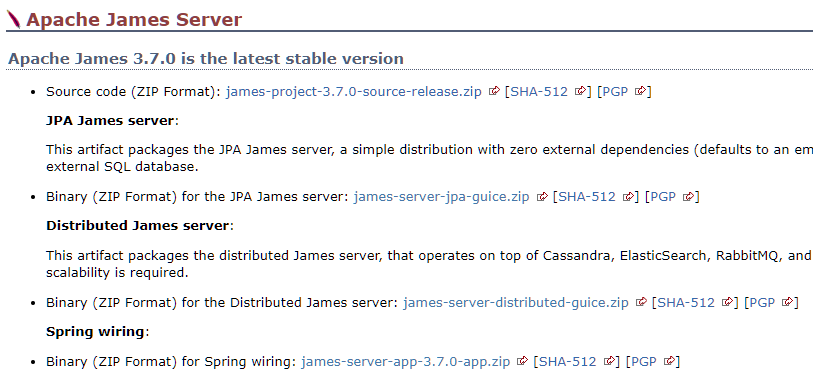
https://james.apache.org/download.cgi#Apache_James_Server

Spring wiring 바이너리를 다운로드한다https://dlcdn.apache.org/james/server/3.7.0/james-server-app-3.7.0-app.zip

cd /usr/local/
wget https://dlcdn.apache.org/james/server/3.7.0/james-server-app-3.7.0-app.zip

3. 압축해제

# unzip 설치
apt install unzip

# 압축해제
unzip james-server-app-3.7.0-ap.zip

# 폴더이름변경
mv james-server-spring-app-3.7.0 james
압축해제후 폴더내용

GitLab – HTTPS 적용하기

메뉴얼을 보면 기본적으로 Let’s Encrypt 를 사용해서 HTTPS을 지원해주지만 직접 받급받은 인증서가 있으면 따로 지정해줄 수 있습니다.

그리고 Sectigo에서 인증서를 발급 받은 경우 CRT파일을 바로 사용하면 SourceTree에서 원격저장소에 로그인 할 때 SSL관련 오류가 뜨니 변경해서 적용해야 합니다.

인증서 합치기

mkdir /etc/gitlab/ssl
cat _wildcard_jongwan_com.crt SectigoRSAAddTrustCA.crt SectigoRSADomainValidationSecureServerCA.crt AAACertificateServices.crt > /etc/gitlab/ssl/jongwan_com_ssl.crt

인증서 적용하기

vim /etc/gitlab/gitlab.rb
################################################################################
## GitLab NGINX
##! Docs: https://docs.gitlab.com/omnibus/settings/nginx.html
################################################################################

nginx['redirect_http_to_https'] = true
nginx['ssl_verify_client'] = "off"
nginx['ssl_certificate'] = "/etc/gitlab/ssl/jongwan_com_ssl.crt"
nginx['ssl_certificate_key'] = "/etc/gitlab/ssl/_wildcard_jongwan_com_SHA256WITHRSA.key"
nginx['ssl_ciphers'] = "ECDHE-ECDSA-AES128-GCM-SHA256:ECDHE-RSA-AES128-GCM-SHA256:ECDHE-ECDSA-AES256-GCM-SHA384:ECDHE-RSA-AES256-GCM-SHA384:ECDHE-ECDSA-CHACHA20-POLY1305:ECDHE-RSA-CHACHA20-POLY1305:DHE-RSA-AES128-GCM-SHA256:DHE-RSA-AES256-GCM-SHA384"
nginx['ssl_prefer_server_ciphers'] = "on"

nginx['ssl_protocols'] = "TLSv1.2 TLSv1.3"

GitLab-CE 설치 / 우분투20.04

우분투 20.04에서 GitLab-CE 를 설치하는 방법

sudo apt update
sudo apt install -y curl openssh-server ca-certificates 

Postfix 설치

sudo apt install postfix

GitLab 패키지 레퍼지토리를 추가

curl https://packages.gitlab.com/install/repositories/gitlab/gitlab-ce/script.deb.sh | sudo bash

설치진행

sudo EXTERNAL_URL="http://git.jongwan.com/" apt install gitlab-ce

8코어로도 시간이 꽤나 소요된다.

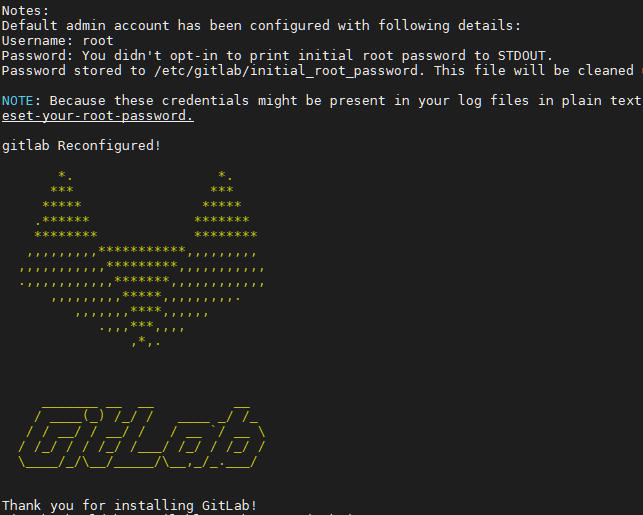
설치완료화면
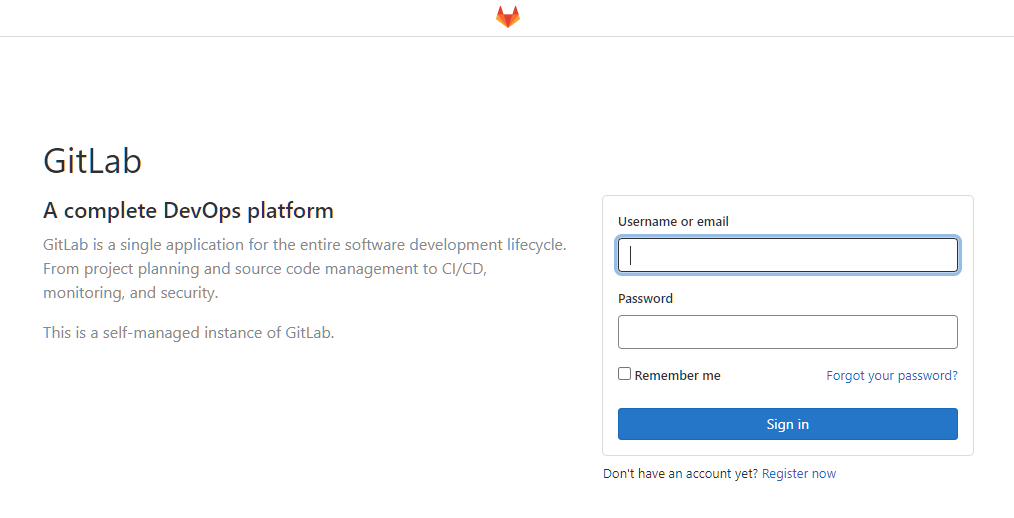
로그인 화면

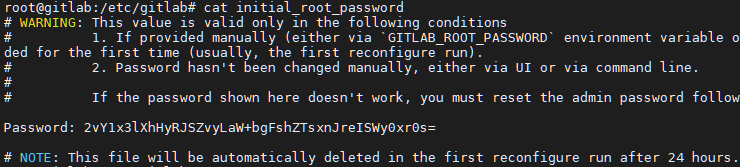
초기 비밀번호

cat /etc/gitlab/initial_root_password
초기비밀번호가 들어있는 파일은 24시간후 삭제됩니다

마지막줄쯤에 Password : 이 다음부분이 비밀번호입니다.

설정파일

vim /etc/gitlab/gitlab.rb

변경내용 적용하기

sudo gitlab-ctl reconfigure

재시작하기

sudo gitlab-ctl restart

Ubuntu 20.04LTS + mariadb 10.5 (replication)

문자메시지 발송서비스 서버 구축을 위해서 mariadb (replication) 를 사용
1,000,000건/일 + @ 처리가 가능해야 한다

서버스펙

Xeon (16core)
samsung 860 pro 1Tb * 2 (RAID0)
32Gb memory

구성

L4 : Active – Standby
mariadb : Master – Slave

서버설치

http://mirror.kakao.com/ubuntu-releases/focal/

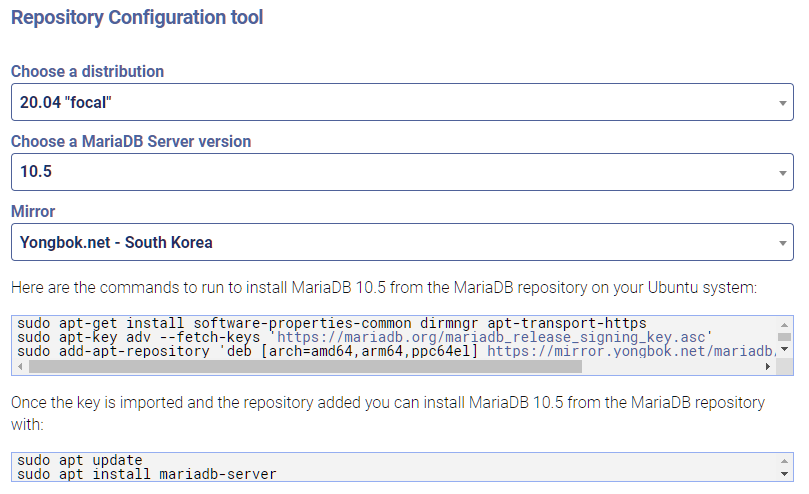
mariadb 설치

sudo apt-get install software-properties-common dirmngr apt-transport-https
sudo apt-key adv --fetch-keys 'https://mariadb.org/mariadb_release_signing_key.asc'
sudo add-apt-repository 'deb [arch=amd64,arm64,ppc64el] https://mirror.yongbok.net/mariadb/repo/10.5/ubuntu focal main'

sudo apt update
sudo apt install mariadb-server

mysql 사용자 설정

mysql -uroot -p
# create user username@localhost identified by 'password';
create user my@'%' identified by '1234';
# grant select on database.table to username@localhost;
grant select on *.* to my@'%';
# grant all privileges on database.table to username@localhost;
grant all privileges on *.* to my@'%';
flush privileges;

replication

master

[mysqld]
server-id = 1
log_bin = /var/log/mysql/mysql-bin.log

vim /etc/mysql/mariadb.conf.d/50-server.cnf

systemctl restart mariadb

Welcome to the MariaDB monitor.  Commands end with ; or \g.
 Your MariaDB connection id is 37
 Server version: 10.5.9-MariaDB-1:10.5.9+maria~focal-log mariadb.org binary distribution
 Copyright (c) 2000, 2018, Oracle, MariaDB Corporation Ab and others.
 Type 'help;' or '\h' for help. Type '\c' to clear the current input statement.
 MariaDB [(none)]> show master status;
 +------------------+----------+--------------+------------------+
 | File             | Position | Binlog_Do_DB | Binlog_Ignore_DB |
 +------------------+----------+--------------+------------------+
 | mysql-bin.000001 |     2098 |              |                  |
 +------------------+----------+--------------+------------------+
 1 row in set (0.000 sec)
 MariaDB [(none)]>
show master status;

slave

[mysqld]
server-id = 2
relay_log=mysql-relay-bin
log_slave_updates = 1
read_only = 1

vim /etc/mysql/mariadb.conf.d/50-server.cnf

systemctl restart mariadb

Welcome to the MariaDB monitor.  Commands end with ; or \g.
 Your MariaDB connection id is 36
 Server version: 10.5.9-MariaDB-1:10.5.9+maria~focal mariadb.org binary distribution
 Copyright (c) 2000, 2018, Oracle, MariaDB Corporation Ab and others.
 Type 'help;' or '\h' for help. Type '\c' to clear the current input statement.

 MariaDB [(none)]> stop slave;
 MariaDB [(none)]> CHANGE MASTER TO
     -> MASTER_HOST='###.###.###.###',
     -> MASTER_PORT=3306,
     -> MASTER_USER='repl',
     -> MASTER_PASSWORD='1234',
     -> MASTER_LOG_FILE='mysql-bin.000001',
     -> MASTER_LOG_POS=2098;
 MariaDB [(none)]> start slave;
 MariaDB [(none)]> show slave status \G;
 * 1. row *
                 Slave_IO_State: Waiting for master to send event
                    Master_Host: ###.###.###.###
                    Master_User: repl
                    Master_Port: 3306
                  Connect_Retry: 60
                Master_Log_File: mysql-bin.000001
            Read_Master_Log_Pos: 2098
                 Relay_Log_File: mysql-relay-bin.000002
                  Relay_Log_Pos: 906
          Relay_Master_Log_File: mysql-bin.000001
               Slave_IO_Running: Yes
              Slave_SQL_Running: Yes
                Replicate_Do_DB:
            Replicate_Ignore_DB:
             Replicate_Do_Table:
         Replicate_Ignore_Table:
        Replicate_Wild_Do_Table:
    Replicate_Wild_Ignore_Table:
                     Last_Errno: 0
                     Last_Error:
                   Skip_Counter: 0
            Exec_Master_Log_Pos: 2098
                Relay_Log_Space: 1215
                Until_Condition: None
                 Until_Log_File:
                  Until_Log_Pos: 0
             Master_SSL_Allowed: No
             Master_SSL_CA_File:
             Master_SSL_CA_Path:
                Master_SSL_Cert:
              Master_SSL_Cipher:
                 Master_SSL_Key:
          Seconds_Behind_Master: 0
  Master_SSL_Verify_Server_Cert: No
                  Last_IO_Errno: 0
                  Last_IO_Error:
                 Last_SQL_Errno: 0
                 Last_SQL_Error:
    Replicate_Ignore_Server_Ids:
               Master_Server_Id: 1
                 Master_SSL_Crl:
             Master_SSL_Crlpath:
                     Using_Gtid: No
                    Gtid_IO_Pos:
        Replicate_Do_Domain_Ids:
    Replicate_Ignore_Domain_Ids:
                  Parallel_Mode: optimistic
                      SQL_Delay: 0
            SQL_Remaining_Delay: NULL
        Slave_SQL_Running_State: Slave has read all relay log; waiting for more updates
               Slave_DDL_Groups: 3
 Slave_Non_Transactional_Groups: 0
     Slave_Transactional_Groups: 0
 1 row in set (0.000 sec)
 ERROR: No query specified
 MariaDB [(none)]>
show slave status \G;